June 5, 2026 by Alex Massaad · 5 min read
Ahrefs Stopped Crawling Your Shopify Store? Here's the Fix

Last week an Ahrefs Site Audit on a client’s Shopify store ran clean. This week the same crawl came back nearly empty, every page returning a block instead of HTML. Nothing in the theme had changed. Nothing in the robots.txt had changed. The crawler had simply stopped getting through.
If you have hit the same wall, with Ahrefs, Screaming Frog, Sitebulb, or your own scraping script, this is not a bug on your end. Shopify changed how it treats automated traffic, and the fix is a setting most merchants have never heard of.
What actually changed
Shopify routes storefront traffic through Cloudflare’s bot protection. For a long time that layer was permissive enough that SEO crawlers slipped through alongside real browsers. That is no longer the case.
Shopify now treats unauthenticated automated traffic as suspect by default. Googlebot and Bingbot get waved through because Cloudflare verifies them automatically. Everything else, Ahrefs Site Audit included, looks identical to a price scraper or a checkout bot, so it gets blocked at the network level before it ever reaches your robots.txt.
That last detail is what makes this confusing. You can read your robots.txt, see that AhrefsBot is allowed with a crawl delay, and conclude nothing is wrong. But robots.txt is a request the server has to serve first. If Cloudflare blocks the connection upstream, the polite rules inside robots.txt never get a chance to apply.
How to tell this is your problem
A few signs point clearly at network-level blocking rather than a configuration mistake:
- The crawl worked recently with no changes on your side
- Nearly every URL returns the same status, often a 403 or a challenge page, rather than a mix of real responses
- Googlebot still indexes the store fine in Search Console, so the site itself is healthy
- Fetching a page by hand in a browser works, but the crawler gets nothing
If that matches what you are seeing, the store is up. The crawler is just no longer trusted.
The fix: Shopify Web Bot Auth
Shopify’s answer to this is Web Bot Auth. It is an authentication scheme that lets a merchant authorize specific automated tools to access the store, so Cloudflare can tell an approved crawler apart from a hostile one.
The mechanism is worth understanding because it explains the setup, which involves a signature and a public key rather than a simple checkbox. Each request the crawler sends carries a cryptographic HTTP message signature. The crawler signs the request with a private key, Shopify holds the matching public key, and Cloudflare verifies the signature on every request. A scraper that has not been authorized cannot forge that signature, so it stays blocked while your approved tool gets through.
In practice the setup looks like this:
- Confirm the crawler supports Web Bot Auth. Ahrefs and the other major SEO tools have been adding support as Shopify rolls this out. Check the tool’s site audit settings for a Shopify or Web Bot Auth option.
- Authorize the tool in Shopify. In the admin this lives under Online Store, then Preferences, where you create a signature that registers the crawler’s identity so Cloudflare will recognize its signed requests as legitimate.
- Match the signing identity on both ends. The public key Shopify trusts has to correspond to the private key your crawler signs with. Get this pairing wrong and every request still fails verification, which is the most common reason a setup looks done but the crawl is still empty.
- Re-run the audit. Once the signature verifies, the crawler reaches your real pages and the audit fills in normally.
If you manage stores for clients, do this per store. Authorization is granted at the store level, not once across your whole account.
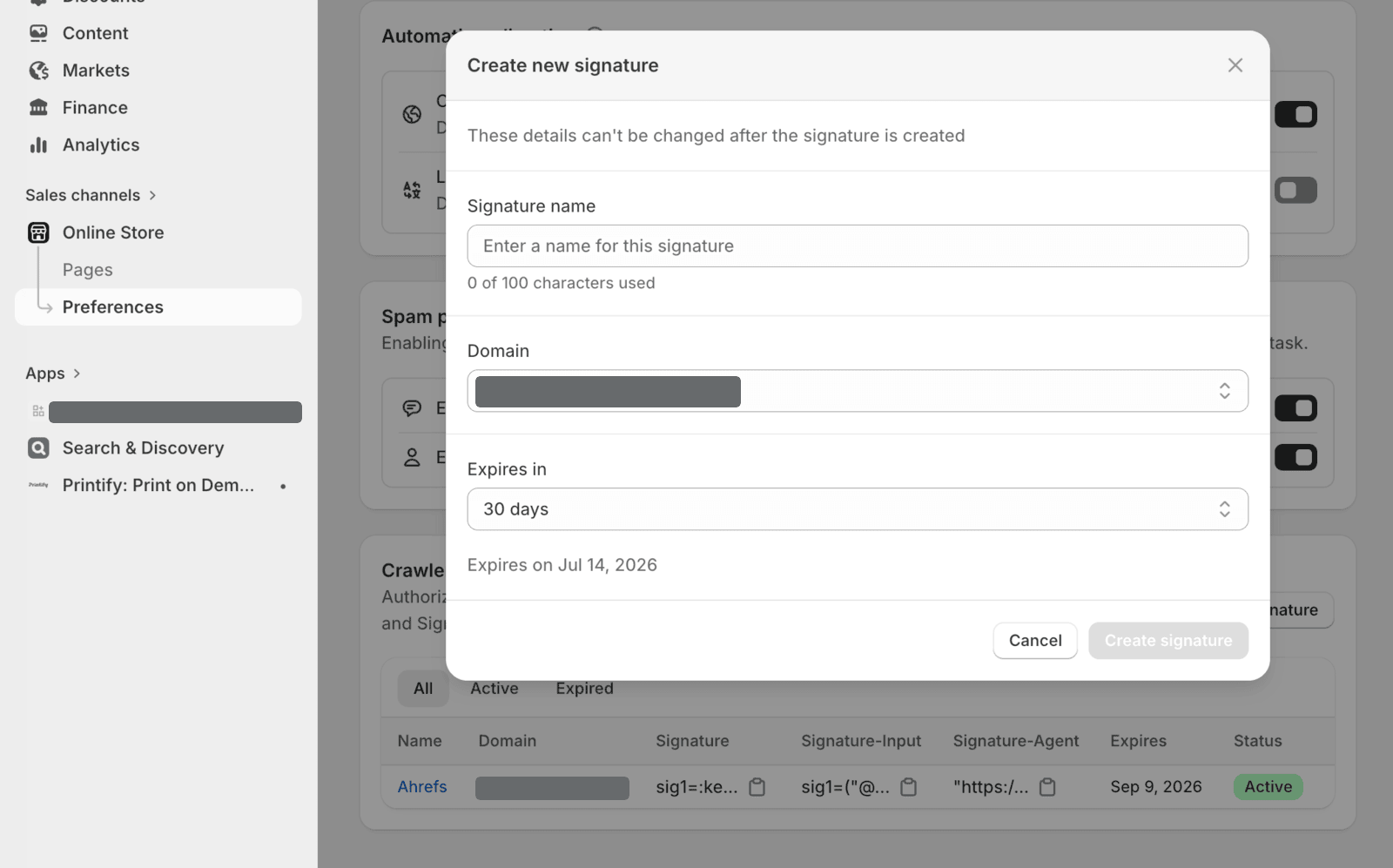
Crawler authorization lives under Online Store, then Preferences. You create a signature per store, and an authorized Ahrefs crawler shows here as active.
What not to do
The tempting shortcut is to start loosening things in robots.txt or stripping out crawl rules, on the theory that the block lives there. It does not, and you can do real damage chasing it.
Opening your robots.txt wider will not restore a crawler that is being stopped upstream by Cloudflare. What it can do is expose paths you meant to keep out of the index, or invite the actual scrapers this system exists to keep out. The block is a trust problem, not a permissions problem, and Web Bot Auth is the part that addresses trust. Leave the robots.txt rules alone.
The bigger picture
This is part of a broader shift. As AI shopping agents and automated buying flows multiply, platforms are moving from open-by-default to verified-by-default for anything that is not a human in a browser. Shopify is early, but it will not be the last. The era where any tool could crawl any storefront unannounced is closing.
For merchants that mostly means one new setup step the first time an SEO tool needs access. For agencies it means adding Web Bot Auth to the onboarding checklist, so a client’s first site audit does not come back blank and get mistaken for a broken store.
If your Shopify audits suddenly went dark and you would rather not untangle the bot-auth setup yourself, get in touch. Diagnosing why a store stopped talking to the tools that depend on it is the kind of technical SEO work we do, and it is usually a faster conversation than it looks.