
Free Chrome Extension
Shopify theme and app detector for Chrome
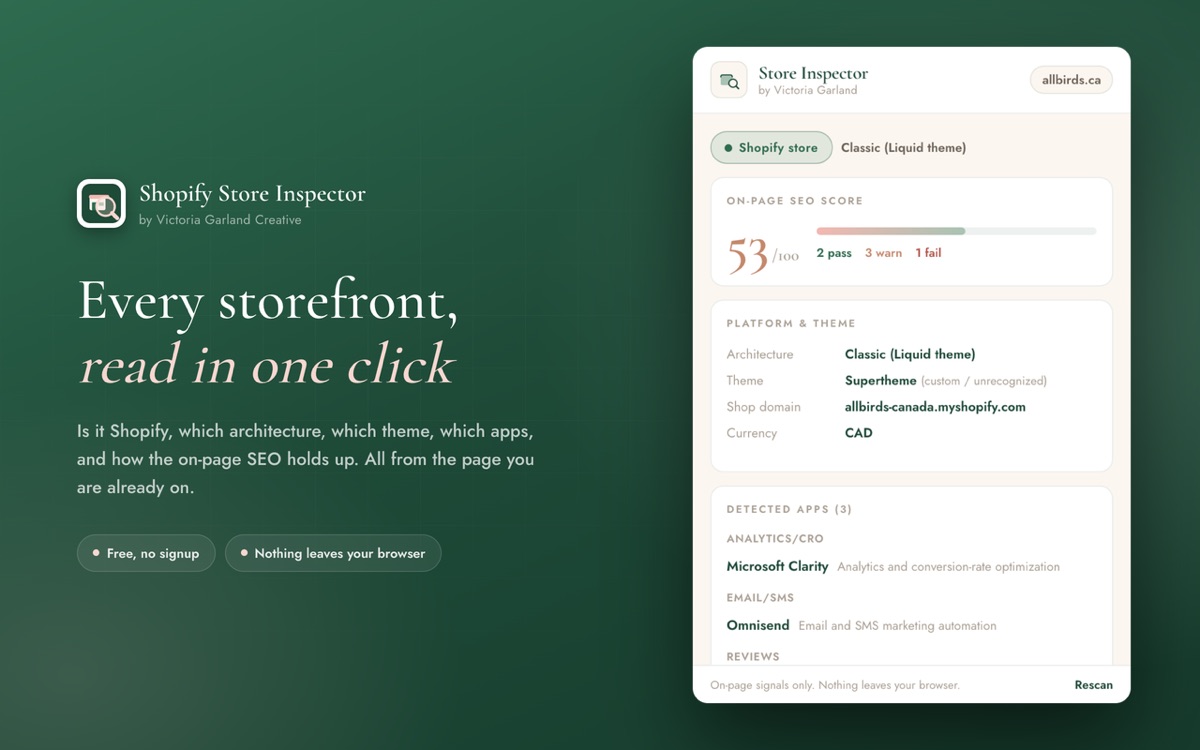
Inspect any storefront you visit in one click: its theme, installed apps, and a 0-100 on-page SEO score. Free, private, and instant. Nothing leaves your browser.
No signup. No account. Works on any store you visit.
Theme detection
Matches the storefront against a library of 60+ Shopify themes by stable schema id, so a renamed theme is still identified correctly.
App fingerprinting
Fingerprints 78 popular Shopify apps across reviews, email, subscriptions, upsells, search, support, loyalty and more.
On-page SEO score
A 0-100 score across title, meta description, canonical, Open Graph, structured data and indexability, each with a specific fix.
Architecture readout
Tells classic Liquid themes apart from headless Hydrogen and Oxygen builds and proxy-fronted storefronts.
Works anywhere
Reads the live page, so it works on staging and password-protected stores a server-side scanner cannot reach.
Private and instant
Runs entirely in your browser when you click. No signup, no server round-trip, no data collection.
Private by design
Most inspector tools send the page you are on to a server to analyze it. This one does not. Everything runs locally inside your browser, on the tab you are already viewing, only when you click the icon.
- Nothing leaves your browser
- No accounts, tracking, or analytics
- Reads only the active tab, only on click
- No broad site permissions
How it works
Open any store
Browse to a storefront you want to understand, yours or a competitor's.
Click the icon
The inspector reads the page you are on. No URL to paste, no waiting on a server.
Read the report
Platform, theme, apps, and a 0-100 on-page SEO score with specific fixes.
Questions
Is this Shopify theme detector free?
Yes. The extension is free to install from the Chrome Web Store, with no account, no trial, and no paid tier. There is also a free web version if you would rather paste a URL than install anything.
How does it detect a Shopify theme?
It reads the storefront markup the browser has already loaded and matches it against a library of 60+ Shopify themes using each theme’s stable schema id, so a theme that has been renamed in the theme editor is still identified correctly.
Can it tell which apps a Shopify store has installed?
It fingerprints 78 popular Shopify apps from the scripts and markup on the page, covering reviews, email and SMS, subscriptions, upsells, search, support, loyalty and page builders. Detection is best-effort: an app that only loads on cart or checkout pages, or that runs through Shopify’s own infrastructure, can be missed.
Does the extension send my browsing data anywhere?
No. Everything runs locally in your browser, on the active tab, only when you click the icon. There is no server round-trip, no analytics, and no data collection. See the extension privacy policy for the full detail.
Does it work on password-protected or staging Shopify stores?
Yes. Because it reads the page you are already viewing rather than fetching the URL from a server, it works on development stores, staging environments, and password-protected storefronts that a URL-based scanner cannot reach.
What is the difference between the extension and the web tool?
Same detection, different entry point. The Chrome extension inspects the tab you are on with one click, and reaches pages behind a login or password. The web tool at /tools/shopify-store-inspector/ takes a pasted URL and needs no install.
Does it work in browsers other than Chrome?
It is built on Manifest V3, so it also installs in Chromium browsers such as Microsoft Edge, Brave, Arc, and Opera through the Chrome Web Store. There is no Firefox or Safari build today.
On-page signals only, read from public storefront markup. Detection is best-effort: a renamed theme or an app that loads through Shopify infrastructure can be missed. This does not measure backlinks, rankings, or off-page SEO. See our privacy policy.